
It has become appallingly obvious that our technology has exceeded our humanity

The era of Computer Buisness!!!

Friday, 20 September 2013

Lambda forms

By popular demand, a few features commonly found in functional programming languages like Lisp have been added to Python.
With the lambda keyword, small "anonymous" functions can be created.
Here’s an example:
>>> a=map(lambda x:x*x,range(10))
>>> a
[0, 1, 4, 9, 16, 25, 36, 49, 64, 81]


Lambda forms can be used wherever function objects are required. They are syntactically restricted to a single expression. Semantically, they are just syntactic sugar for a normal function definition. Like nested function definitions, lambda forms can reference variables from the containing scope:
While using lambda there is no scope for using loops and all.
Only a single statement can be included.

Filter(), Map() and Reduce()-----> Tools for functional programming

Filter() map() and reduce() are built in functions. These are very useful while used with lists. Here are the details.

Filter()


Syntax:
                filter(function,sequence)


returns a sequence consisting of those elements from the sequence for which function(element) is true. If sequence is a string or tuple, the result will be of the same type, otherwise, it is always a list.
 For example, to compute a sequence of numbers not divisible by 2 and 3:
 >>> def f(x):
...     return ((x%2!=0) and (x%3!=0))
...
>>> filter(f,range(0,10))
[1, 5, 7]

Map()

Syntax:
               map(function,sequence)
Calls the function() for each value in the sequence and stores the return value in a list. For example:
>>> def cube(x):
...     return x*x*x
...
>>> map(cube,range(10))
[0, 1, 8, 27, 64, 125, 216, 343, 512, 729]
>>> 
More than one sequence may be passed; the function must then have as many arguments as there are sequences and is called with the corresponding item from each sequence (or None if some sequence is shorter than another). For example:
>>> def f(x,y):
...     return x+y
...
>>> seq=range(8)
>>> map(f,seq,seq)
[0, 2, 4, 6, 8, 10, 12, 14]
>>>


Reduce()

Syntax:
                  reduce(function,sequence)              

returns a single value constructed by calling the binary function "function" on the first two items of the sequence, then on the result and the next item, and so on. For example, to compute the sum of the numbers 1 through 10:
>>>
>>> def f(x,y):
...     return x+y
... 
>>>reduce(f,range(1,11));
55

If there’s only one item in the sequence, its value is returned; if the sequence is empty, an exception is raised.A third argument can be passed to indicate the starting value.

My first game code...

/*                              Chaythanya
   If you are using turbo cpp compiler try to include conio.h ang uncomment the
   function clrscr() for better looks */
#include<stdio.h>
#include<stdlib.h>
//#include<conio.h>
char a[5][5];
char pa[5][5];
int pc=0;
int r,c;
void intro(char* player);
int find(int choice);
void firstdisplay();
void make();
void play();
void display(char a[5][5]);
void play();
void intro(char* player)
{
    printf("\n\t Welcome %s.. here are the rules of the game\n",player);
    firstdisplay();
    printf("\n\t This is the board, there are no empty columns each column is filled with either mine or character ");
    printf("\n\t choose the appropriate no: to open the block\n\t Game begins!!...\n\n\n"); 
}
void make()
{
    int i,j;
    int d=65;
    for(i=0;i<5;i++)
    {
        for(j=0;j<5;j++)
        {
            pa[i][j]=' ';
            if(pc==1)
            {
            if(5*(i+j)%3==0)
                a[i][j]='X';
            else
            {
                if((d!=120)&&(d!=88))
                {
                    a[i][j]=d;
                    d++;
                }
            }
            }
            else
            {
            if((i+j)%(pc+1)==0)
                                a[i][j]='X';
                        else
                        {
                                if((d!=120)&&(d!=88))
                                {
                                        a[i][j]=d;
                                        d++;
                                }
                        }
            }

        }
    }
    firstdisplay();
}
void firstdisplay()
{
    printf("\t _____ _____ _____ _____ _____ \n");
        printf("\t|     |     |     |     |     | \n");
        printf("\t| 1   |  2  |  3  | 4   |  5  |\n");
        printf("\t|_____|_____|_____|_____|_____|\n");
        printf("\t|     |     |     |     |     |\n");
        printf("\t| 6   |  7  |  8  |  9  | 10  |\n");
        printf("\t|_____|_____|_____|_____|_____|\n");
        printf("\t|     |     |     |     |     |\n");
        printf("\t| 11  | 12  | 13  | 14  | 15  |\n");
        printf("\t|_____|_____|_____|_____|_____|\n");
    printf("\t|     |     |     |     |     |\n");
        printf("\t| 16  | 17  | 18  | 19  | 20  |\n");
        printf("\t|_____|_____|_____|_____|_____|\n");
    printf("\t|     |     |     |     |     |\n");
        printf("\t| 21  | 22  | 23  | 24  | 25  |\n");
        printf("\t|_____|_____|_____|_____|_____|\n");
}
void play()
{
    int b;
    printf("\n\t Enter the block you want to open:");
    scanf("%d",&b);
    int success= find(b);
    if(!success)
    {
       
        pa[r][c]=a[r][c];
        if(a[r][c]=='X')
        {
            display(a);
            return;
        }
        else
        {        display(pa);
                play();
        }
    }
    else
    {
        printf("\n\n\t Wrong choice!!.. try again!!\n\n");
        display(pa);
        play();
    }
}

int find(int choice)
{
    if(choice==1){
                r=0;
                c=0;
        return 0;
        }
        else if(choice==2){
                r=0;
                c=1;
        return 0;

        }
        else if(choice==3){
                r=0;
                c=2;
        return 0;

        }
        else if(choice==4){
                r=0;
                c=3;
        return 0;

        }
        else if(choice==5){
                r=0;
                c=4;
        return 0;

        }
        else if(choice==6){
                r=1;
                c=0;
        return 0;

        }
        else if(choice==7){
                r=1;
                c=1;
        return 0;

        }
        else if(choice==8){
                r=1;
                c=2;
        return 0;

        }
        else if(choice==9){
                r=1;
                c=3;
        return 0;

        }
    else if(choice==10){
                r=1;
                c=4;
        return 0;

        }
        else if(choice==11){
                r=2;
                c=0;
        return 0;

        }
        else if(choice==12){
                r=2;
                c=1;
        return 0;

        }
        else if(choice==13){
                r=2;
                c=2;
        return 0;

        }
        else if(choice==14){
                r=2;
                c=3;
        return 0;

        }
        else if(choice==15){
                r=2;
                c=4;
        return 0;

        }
        else if(choice==16){
                r=3;
                c=0;
        return 0;

        }
        else if(choice==17){
                r=3;
                c=1;
        return 0;

        }
        else if(choice==18){
                r=3;
                c=2;
        return 0;

        }
        else if(choice==19){
                r=3;
                c=3;
        return 0;

        }
        else if(choice==20){
                r=3;
                c=4;
        return 0;

        }
        else if(choice==21){
                r=4;
                c=0;
        return 0;

        }
        else if(choice==22){
                r=4;
                c=1;
        return 0;

        }
        else if(choice==23){
                r=4;
                c=2;
        return 0;

        }
        else if(choice==24){
                r=4;
                c=3;
        return 0;

        }
        else if(choice==25){
                r=4;
                c=4;
        return 0;

        }
        else
        return 1;
}
  

void display(char a[5][5])
{
   

    printf("\t _____ _____ _____ _____ _____ \n");
        printf("\t|     |     |     |     |     | \n");
        printf("\t|  %c  |  %c  |  %c  |  %c  |  %c  |\n",a[0][0],a[0][1],a[0][2],a[0][3],a[0][4]);
        printf("\t|_____|_____|_____|_____|_____|\n");
        printf("\t|     |     |     |     |     |\n");
        printf("\t|  %c  |  %c  |  %c  |  %c  |  %c  |\n",a[1][0],a[1][1],a[1][2],a[1][3],a[1][4]);
        printf("\t|_____|_____|_____|_____|_____|\n");
        printf("\t|     |     |     |     |     |\n");
        printf("\t|  %c  |  %c  |  %c  |  %c  |  %c  |\n",a[2][0],a[2][1],a[2][2],a[2][3],a[2][4]);
        printf("\t|_____|_____|_____|_____|_____|\n");
        printf("\t|     |     |     |     |     |\n");
        printf("\t|  %c  |  %c  |  %c  |  %c  |  %c  |\n",a[3][0],a[3][1],a[3][2],a[3][3],a[3][4]);
        printf("\t|_____|_____|_____|_____|_____|\n");
        printf("\t|     |     |     |     |     |\n");
        printf("\t|  %c  |  %c  |  %c  |  %c  |  %c  |\n",a[4][0],a[4][1],a[4][2],a[4][3],a[4][4]);
        printf("\t|_____|_____|_____|_____|_____|\n");

}
void main()
{
    char player,choice;
    do
    {
    pc++;
//    clrscr();   
    printf("\t\t MINE SWEEPER------> DEMO");
    printf("\n\t\t*************************");
    printf("\n\n\tEnter the name of the player:");
    scanf(" %s",&player);
    intro(&player);
    make();
    play();
    printf ("\n\n\t GAME OVER!!\n\n");
        printf("\n\n\tDo you wish to continue?(Y/n)");
        scanf(" %c",&choice);
    if(pc>3)
        {
                printf("\n\n\tOOops!! You have exceeded your maximum no: of chances well.. Better luck next time..\n\n");
                exit(1);
        }

    }
        while((choice=='Y'||choice=='y'));

                             
}


Wednesday, 18 September 2013

Modules and Modular programming

If you want to develop programs which are easily readable, reliable and for which easy debugging is possible without too much effort, you have to use some kind of modular software design...
Especially if your application has a certain size. Modular programming is a  technique to split the code into separate parts. These parts are called modules.

But how do we create modules in Python?
A module in Python is just a file containing Python definitions and statements. The module name is the file name by removing the suffix ".py". For example, if the file name is fibb.py, the module name is fibb.
This is how we create modules.We save the following code in the file fibb.py:
def fib(n):
     if n == 0:
       return 0
     elif n == 1: 
       return 1 
     else:
       return fib(n-1) + fib(n-2) 
def fib1(n): 
     a, b = 0, 1 
     for i in range(n):
       a, b = b, a + b 
return a

Now save this file and open the interactive python promt. type in the following code
>>> import fibb
>>> fibb.fib(3)
2
>>> fibb.ifib(3)
2
in this way you can use modules instead of typing the code each time..

There are many inbuilt python modules also. One such example is "math"
>>> import math
>>>math.sin(0)
0.0
>>> dir(math)
['__doc__', '__name__', '__package__', 'acos', 'acosh', 'asin', 'asinh', 'atan', 'atan2', 'atanh', 'ceil', 'copysign', 'cos', 'cosh', 'degrees', 'e', 'erf', 'erfc', 'exp', 'expm1', 'fabs', 'factorial', 'floor', 'fmod', 'frexp', 'fsum', 'gamma', 'hypot', 'isinf', 'isnan', 'ldexp', 'lgamma', 'log', 'log10', 'log1p', 'modf', 'pi', 'pow', 'radians', 'sin', 'sinh', 'sqrt', 'tan', 'tanh', 'trunc']


These are the other operations defined on the module math.
There are different kind of modules:
  • Those written in Python
    They have the suffix: .py
  • Dynamically linked C modules
    Suffixes are: .dll, .pyd, .so, .sl, ...
  • C-Modules linked with the Interpreter:
    It's possible to get a complete list of these modules:


Memory----> Python rocks!

Advantage of automatic memory management--> Demo

 In c language we have to explicitly deallocate the memory after use. Folowing is a set of C code which runs an infinite loop.
#define LEN 10000
void fun()
{
    char *p;
    p = malloc(LEN);
    if(p == 0) {
        perror("malloc failed");
        exit(1);
    }
    free(p);
}
main()
{
    /* call "fun" in an infinite loop */
    while(1) {
        fun();
    }
}

In this case the CPU is fully engaged but the memory consumption remains almost constant because as soon as the memory is allocated it is deallocated using free().

After the program is terminated....


This is another example where memory is not deallocated... Careful the system might get stuck...
#include <stdlib.h>
#define LEN 10000
void fun()
{
    char *p;
    p = malloc(LEN);
    if(p == 0) {
        perror("malloc failed");
        exit(1);
    }
}
main()
{
    while(1) {
        fun();
        usleep(10);
 /* slow down the loop a little bit */
    }
 }
Here the memory runs out..
Where as running this python code we get the same result as in the first program..

while True:
    a = [1] * 1000000
First a list is created and a referenced to it. when a is again referenced to another list then the first list is unreferenced and is not accessible hence it is automatically deleted or removed from the memory


List/Set/dictionary Comprehensions

Comprehension is an elegant way to define and create lists/Dictionaries/sets in Python.

 List comprehension

>>> a=[1,2,3,4]
>>> b=[x+1 for x in a]
>>> print b
[2, 3, 4, 5]
 
This can be used as a substitute for map function.
It can even have conditional statements for eg:
 >>> a=range(50)
>>> a
[0, 1, 2, 3, 4, 5, 6, 7, 8, 9, 10, 11, 12, 13, 14, 15, 16, 17, 18, 19, 20, 21, 22, 23, 24, 25, 26, 27, 28, 29, 30, 31, 32, 33, 34, 35, 36, 37, 38, 39, 40, 41, 42, 43, 44, 45, 46, 47, 48, 49]
>>> b=[x for x in a if ((x%8)==0 and (x%3)==0)]
>>> b
[0, 24, 48]

This piece of code prints all the nos between 0 and 50 thos are divisible by both 8 and 3. 
This is how comprehensions make python more attractive!

Set comrehension

 Set comprehension also works like list comprehension with an exception that it does not have any duplicate elements. Further there is a slight difference in the syntax also.
This is how we can use set comprehensions:
 >>>S= {-4, -2, 1, 2, 5, 0}
 Write a triple comprehension those value is a list of all three element tuples (i,j,k) such that i,j,k are elements of S whose sum is zero.
>>>S = {-4, -2, 1, 2, 5, 0}
>>>zero_sum_list ={(x,y,z) for x in S for y in S for z in S if (x+y+z)==0}
This is an example for triple comprehension.


Modifying the above comprehension so that the resulting list does not include (0,0,0) we get:
>>>excluded_zero_sum_list ={(x,y,z) for x in s for y in s for z in s if ((x+y+z)==0} and (x or y or z)!=0)] 

Dictionary comprehension


Dictionary comprehensions are used to create dictionaries. Almost like the above two types. These are mainly used when we have a relation between the 'key' and the 'value' and the same relation is repeated throughout the dictionary.
Here is a n example:
Using `range', write a dictionary comprehension: the keys of the dictionary are values from 0 to 4 and the value corresponding to each key is the square of the key.

>>>square_dict ={x:x*x for x in range(5)]
>>> square_dict
{0: 0, 1: 1, 2: 4, 3: 9, 4: 16}


Shallow and deep copying

According to reference semantics, we know that only reference are meaningful than real objects.
There are certain crucial problems, which can occur when copying mutable objects, like copying lists and dictionaries.

Copying with the slice operator

It's possible to completely copy shallow lists with the slice operator without any problem, which is described below:
>>> l=[1,2,3,4]
>>> l2=l[:]
>>> print l
[1, 2, 3, 4]
>>> print l2
[1, 2, 3, 4]
>>> l.append(5)
>>> print l2
[1, 2, 3, 4]
>>> print l
[1, 2, 3, 4, 5]

But as soon as a list contains sublists, we have the some difficulty, i.e. just references to the sublists are copied and not the actual members of the lists.

>>> #shallow copying
...
>>>
>>>
>>> a=[1,2,3,[4,5],6,7,[8,9],10]
>>> b=a
>>> c=a[:]
>>> print b
[1, 2, 3, [4, 5], 6, 7, [8, 9], 10]
>>> print c
[1, 2, 3, [4, 5], 6, 7, [8, 9], 10]
>>> a.append(11)
>>> print a
[1, 2, 3, [4, 5], 6, 7, [8, 9], 10, 11]
>>> print b
[1, 2, 3, [4, 5], 6, 7, [8, 9], 10, 11]
>>> print c
[1, 2, 3, [4, 5], 6, 7, [8, 9], 10]
>>> a[3].append('innerlist')
>>> print a
[1, 2, 3, [4, 5, 'innerlist'], 6, 7, [8, 9], 10, 11]
>>> print b
[1, 2, 3, [4, 5, 'innerlist'], 6, 7, [8, 9], 10, 11]
>>> print c
[1, 2, 3, [4, 5, 'innerlist'], 6, 7, [8, 9], 10]
>>>
 
This behaviour is depicted in the following diagram: 

In this case, while lst1 is copied into lst2 only the reference which was there in lst1 is copied and not the original values.
If you assign a new value to the 0th Element of one of the two lists, there will be no side effect. Problems arise, if you change one of the elements of the sublist. 
           
                   
              Copying a list with sublists


The following diagram depicts what happens, if one of the elements of a sublist will be changed: Both the content of lst1 and lst2 are changed.

         
                 Copying lists containing sublists

Method of deep copying

Deepcopy is a "method" which needs to be imported from the module copy.

The following script uses our example above and this method:
>>> from copy import deepcopy
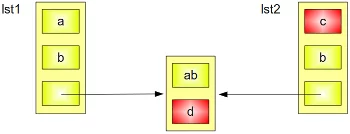
>>>lst1 = ['a','b',['ab','ba']] 
>>>lst2 = deepcopy(lst1) 
>>>lst2[2][1] = "d" 
>>>lst2[0] = "c"; 
>>>print lst2
['c','b',['ab','d']]
>>> print lst1
['a','b',['ab','ba']]

                    Copy a list with Deep-Copy


Friday, 13 September 2013

PYTHON-------> OVERVIEW OF THE KEY CONCEPTS

Reference semantics

Everything in Python is an object and Python passes references to those objects i.e. consider the following case
 >>> a=[1,2,3,"hello",4,"hai"]
>>> b=a

while this code is interpreted this is what internally happens.

 a--------------->[1,2,3,"hello",4,"hai"]
                                ^
                                |
                                |
                                b
Internally in the memory there is only one list "[1,2,3,"hello",4,"hai"]" and both "a" and "b" are mere names with which you can acees the memory location.
this can be demonstrated by the following set of code.
>>> a=[1,2,3,"hello",4,"hai"]
>>> b=a
>>> a.append("change")
>>> print b
[1, 2, 3, 'hello', 4, 'hai', 'change']

The change made to "a" internally reflects to "b" this makes it clear that "a" and "b" refers to the same thing.
If we pass an immutable object to a method, it references the original object, and you can't change the object.

Memory management

 In C language we use malloc() to allocate memory and free() to free the allocated memory.IF we forget to free() the memory that has been allocated serious problems may occur and there are chances for your program to get "crashed".
Python introduces a solution for this by "automatic memory management". Python uses reference counting to detect inaccessible objects. The "garbage collection" module provides functions to force garbage collection.It uses something called "ref-count" to do this. 

Reference counting and garbage collection

Python automatically deletes inaccessible memory locations. For example consider the following set of code.
 >>> a=[1,2,3,"hello",4,"hai"[ref_count=1]] #ref_coutn is a hypothetical concept and not a member of the list]
>>> b=a
>>> a.append("change")
>>> print b
[1, 2, 3, 'hello', 4, 'hai', 'change'[ref_count=2]]
>>> c=b
>>> c=(1,2,3)
>>> b="steve"
>>> a="john"
here this is what happens
step1
-----------------------------------------------------------------------
a--------------->[1,2,3,"hello",4,"hai"]
                                ^ 

                                |

                                |

                                b
a--------------->[1,2,3,"hello",4,"hai","change"[ref_count=2]]   
                                ^ 

                                |

                                |

                                b
 step2
----------------------------------------------------------------------------------
a--------------->[1,2,3,"hello",4,"hai","change"[ref_count=3]]
                                ^  ^

                                |   |

                                |   |

                                b  c
step3
---------------------------------------------------------------------------------
a--------------->[1,2,3,"hello",4,"hai","change"[ref_count=2]]
                                ^ 

                                |

                                |

                                b                c----->(1,2,3)
step4
-----------------------------------------------------------------------------------

a--------------->[1,2,3,"hello",4,"hai","change"[ref_count=1]]
                              
b------>"steve"
c------->(1,2,3)

step5
------------------------------------------------------------------------------------

""----------------------->>>[1,2,3,"hello",4,"hai","change"[ref_count=0]] 
 a------>"john"
 b------>"steve"
c-------->(1,2,3)

************************************************************
Now it is evident that there is no name with which we can access th list
[1,2,3,"hello",4,"hai","change"[ref_count=0]]
and the ref_count is 0 hence python gets to know that it is a mere waste of memory therefore python automatically releases that memory space.


Key Concepts:

THE KEY CONCEPTS OF PYTHON:

a) Dynamic Typing
b) Static Typing / Type Inference
c) Automatic Memory Management
d) Execution Model / Errors
e) Reference Semantics
f) Mutability / shallow and deep copying
g) List/Dictionary/Set Comprehensions

Thursday, 12 September 2013

LOOPS

Loops in python are just like the loops we use in C and other languages.
There are other special applications also for the loops in python.
For example we have just seen an else statement for an if statement but in Python we can have an else statement for a loop even.
Loops supported by Python:
  • for loop
  • while loop

FOR LOOP 

syntax:
>>>v = (1, 3, 5, 6, 7)

>>>for i in v:
 ........   print i

WHILE LOOP

The syntax of while loop is also almost the same like the one used in C language.
syntax:
 >>> i=0
>>> while i<10:
...     print i,
...     i=i+1
...
0 1 2 3 4 5 6 7 8 9


Monday, 9 September 2013

Datatypes in python


MUTABILITY & IMMUTABILITY

The values of all the datatypes cannot be changed in python.
Those datatypes whose members can be modified are called mutable datatypes whereas those other datatypes whose members cannot be modified are called immutable datatypes

Datatypes in python


Python supports very many types of complex data types which can be even referred to as data structures. They are:
  • integer
  • strings
  • lists
  • tuples
  • dictionaries
  • sets

Integer

Barely here means the same old integer in all other languages. Operation defined on Integers are also the same.
>>>a=5
>>>b=3
>>>a+b
8
>>>a*b
15
>>>a**b
125

------>long

Python can handle fairly long values. There is no need of a special data type call long, for example
>>> a=100
>>> b=100
>>> a**b
100000000000000000000000000000000000000000000000000000000000000000000000000000000000000000000000000000000000000000000000000000000000000000000000000000000000000000000000000000000000000000000000000000000L
Here the L signifies the integer is a " long " integer.

Strings

Strings are just an array of characters and mean the same as in C language.
Strings are immutable.
That is operations like appending a character or changing the character using the index etc are not possible in here.
This is how u declare strings in python
>>> a='hello'
>>> b="worldd"
>>> a+b
'helloworldd'
>>> a*2
'hellohello'
>>> b*3
'worlddworlddworldd'

Lists

Lists are a special type of datatype that resembles an array but a lot more complex than a C array.
A list can contain a fair set of arbitary elements and are Mutable.
A list can be made as follows
>>> a=[1,2,"hello",3,5]
Lists may contain further lists within it.
>>>b=[1,2,a,7,8,"hai"]
>>>b
[1,2,[1,2,"hello",3,5],7,8,"hai"]
The [] operator is used to access individual elements of a list.
>>> x = [1, 2, 3]  
>>> x[1] 
2
 >>> x[1] = 4
>>> x[1]
  4

Tuples

Tuples are almost like lists but differ a little. Tuples are generally Immutable and have a different syntax.
This is how you declare tuples in Python
>>>a=(1,2,3,"hello")

Dictionaries

Dictionaries here are a key value mapping idea. That is it a set of keys mapped to their corresponding values.
We can have any Python data type as a value but while selecting the keys care should be taken that it is IMMUTABLE.
Therefore a list cannot be used as a key in dictionaries... It generates an ERROR!!
A dictionary can be declared as follows
>>>a={1:"hai","hello":[1,2],(1,2,3):"hehe"}

Sets

Sets are just the same as what we call "sets" in mathematics with some exemptions.  Sets can have not only nos as its elements but also other datatypes like characters and strings. Sets cannot have other sets as its element.This is how you declare a set in Python
>>>a={1,2,3,4}
Or you can do it by calling set() also
>>>a=set([1,2,3])

NOTE

When you do something like this
>>>a={}
It means a dictionary and is not considered as a set!!


Sunday, 8 September 2013

PYTHON

Python is a general purpose high level programming language which is very much used today.It is now very much popular because of its simple "looking" features. It has much simple syntax as compared to other programming languages which looks rather sophisticated.
Key concepts of Python:
  • Dynamic Typing
  • Automatic Memory Management
These are the two important features of python that makes it better than other High Level Programming languages like C, C++ and Java.

DYNAMIC TYPING

Dynamic typing helps us to declare variables without referring to its type, this is not possible in languages like C....
For example if you have to declare a integer variable in C language you have to explicitly give that it is of th type "int"
int a=3;
whereas in python
>>> a=3
>>>type(a)
>>> <type 'int'>

here we can see that python knows that a is of type "integer".

AUTOMATIC MEMORY MANAGEMENT

Python automatically deallocates or returns the memory which was allocated for some purpose back to the RAM once it is not accessible or once the "REFCOUNT" is 0.
In languages like C, C++ u have to explicitly call the function "free()" to deallocate the memory space.
And if the memory is not deallocated or freed it would create serious problem and cause the program to "CRASH".
This is called a "memory leak" . Often while writing codes in C and C++ programmers forget to deallocate the memory space, while python reduces the burden over the programmers by AUTOMATIC MEMORY MANAGEMENT